Is u-he Tyrell N6 still free in 2026? Yes. TyrellN6 Beta 3.0.0 (revision 16976) is available at no cost from u-he’s official product page. The March 2025 refresh brought the long-running virtual-analogue synth onto u-he’s own download site, with CLAP support, improved VST3 compatibility, native Apple Silicon support and a more modern preset browser. It does not require a serial number to unlock.
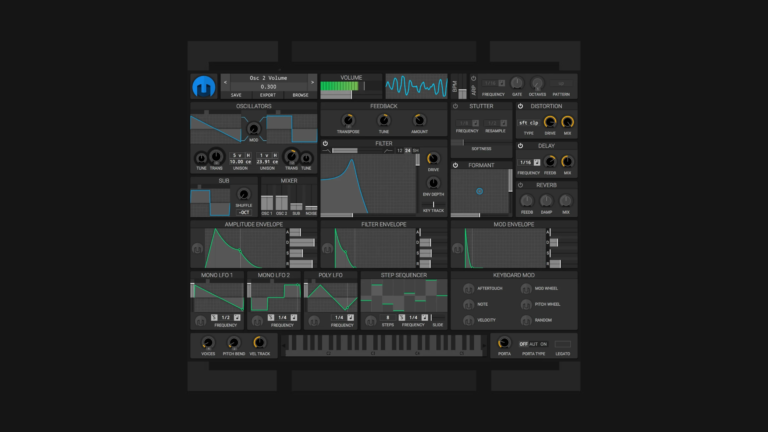
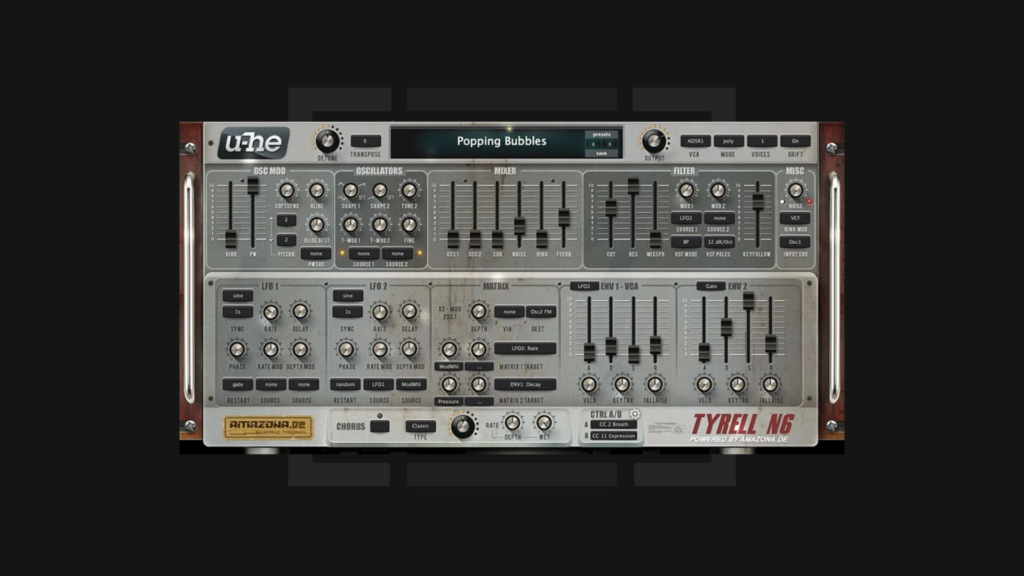
Tyrell N6 grew out of a proposed hardware synthesizer discussed by the German music technology publication Amazona.de, before u-he built it as a software instrument. The appeal is straightforward: two main oscillators, a sub-oscillator, a characterful multimode filter, modulation options, analogue-style envelopes and a three-mode chorus, all without a complicated multi-page interface. For techno producers, that is a practical starting point for basslines, stabs, pads, leads and effects.
This is Underground Talent’s updated Tyrell N6 download, installation and sound-design guide. It separates the 2025 beta from older versions, lists the actual supported plug-in formats, explains the synthesizer’s key controls and walks through three original techno patch ideas. We also cover preset migration, compatibility issues and what the current release still cannot do.
Reviewed 31 October 2026. Specifications and limitations below were checked against u-he’s official TyrellN6 page, release notes, the 2025 user guide, and u-he’s September 2026 compatibility guidance. This guide does not claim independent testing on every DAW or operating system.
u-he Tyrell N6: key facts in 2026
| Question | Verified answer |
|---|---|
| Developer | u-he (Heckmann Audio), originally created with Amazona.de |
| Price | Freeware; no paid licence or serial number required for TyrellN6 Beta |
| Current listed release | 3.0.0 beta, revision 16976, released 18 March 2025 |
| Sound engine | Virtual-analogue subtractive synthesizer with two oscillators, sub, noise, ring modulation and multimode filtering |
| Polyphony | Eight synth voices total; using two unison voices per note leaves four-note polyphony |
| Modulation | Two tempo-syncable LFOs, two envelopes and a small two-slot matrix, plus oscillator cross-modulation |
| Effects | Built-in chorus with Classic, Dramatic and Ensemble modes |
| Presets | More than 580 factory presets listed by u-he |
| Windows | Windows 7 or newer; VST3 in 32-/64-bit hosts, CLAP and AAX in 64-bit hosts |
| macOS | macOS 10.10+ per product page; 64-bit AUv2, VST3, CLAP and AAX, including native Apple Silicon |
| Linux | 64-bit VST3 and CLAP, glibc 2.28+; u-he classifies Linux support as beta |
| Official download | u-he.com/products/tyrelln6/ |
u-he’s release notes specify a CPU supporting SSE4.2, and the product page lists a 1000 × 600 or larger display and approximately 30–110 MB available disk space. A compatible DAW is required: Tyrell N6 is not described as a standalone synthesizer application in the current release. Use the version-specific requirements, particularly for old computers and newer macOS releases.
Where to download Tyrell N6 safely
The best place is now the official TyrellN6 Beta download page. The original Amazona collaboration is part of the history, but you no longer need to hunt for a download on a magazine website. u-he began hosting the freeware synth directly in March 2025 after years of distribution through Amazona.
- Open u-he’s product page using a desktop browser.
- Scroll to the downloads and select your operating system: Windows, macOS or Linux.
- Check that the release shown is the one intended for your system; the publicly documented beta in this review is version 3.0.0, revision 16976.
- Download the installer from u-he’s domain rather than an unofficial bundle, crack or repackaged mirror.
- Read the installer’s choices and select a plug-in format that your DAW actually supports.
- Open your DAW, rescan plug-ins if necessary, load Tyrell N6 onto an instrument track and audition a factory preset.
The product page may label a download button “Demo”, following u-he’s common site design, but Tyrell N6 itself is freeware and does not require a paid unlock. The developer also provides an older-release archive for legacy systems. Use that only when the current build is unsuitable, and keep a backup of projects that depend on the older version.
Official download: TyrellN6 Beta for Windows, macOS and Linux — u-he.
What changed in the March 2025 Tyrell N6 beta?
This is the main factual correction to older reviews of Tyrell N6. The interface still resembles Ryo Ishido’s earlier design, and the version may still display 3.0.0, but the 2025 build is not just the old 2013 instrument with the same installer. u-he updated the underlying plug-in technology and repaired a range of issues.
| Area | What u-he added or changed |
|---|---|
| Plug-in support | New CLAP format, substantially improved VST3 integration, native Apple Silicon and improved AAX automation |
| Preset workflow | Modern preset browser, reorganised factory library and drag-and-drop installation of soundsets |
| Interface | GUI performance improvements, additional 50% and 60% sizes, and simplified configuration |
| Musical control | MTS–ESP microtuning support, configurable MIDI CC inputs, and VST2-to-VST3 migration support in compatible hosts |
| Stability and installation | Fixes for silent presets, script-preset crashes and host-specific issues, plus an improved Windows installer/uninstaller |
These details come from u-he’s March 18, 2025 announcement and the revision 16976 release notes. u-he still labels the release a beta, even though it makes the build available publicly and describes the installers as stable beta versions.
Do not confuse planned MPE features with current ones
The developer describes this update as an intermediate step before a future visual redesign and features including MPE and polyphonic parameter modulation. The published March 2025 release notes explicitly state that the CLAP version does not yet support per-voice parameter modulation. That is a future ambition, not a current selling point. If your performance depends on MPE or per-note expression, verify the exact version and functionality before installing it for a live set.
What happens to existing presets?
The factory preset library was substantially reorganised. u-he says its Mac installer replaces factory files automatically, while Windows and Linux users should consider removing the original factory-library folder before updating. Back up custom patches first, and do not delete a personalised preset directory because it resembles a factory folder. Moving from VST2 to VST3 may be supported by particular hosts through a compatibility interface, but project recall is not guaranteed in every DAW. Save a copy of an important session and test it before removing an old installation.
Tyrell N6 system requirements and plug-in formats
Windows: VST3, CLAP and AAX
The 2025 beta supports Windows 7 and newer, according to the product page. Its 32-bit Windows option is VST3 only; 64-bit Windows offers VST3, CLAP and AAX. AAX requires a compatible Pro Tools version. For a typical current 64-bit DAW, choose VST3 unless there is a specific reason to use CLAP or another available format.
Use the installer rather than copying random files from another computer. VST3 files normally belong in the standard system VST3 location, while legacy VST2 plug-in paths may be user-defined. After installation, refresh your plug-in scan and look under software instruments, not audio effects.
macOS: Audio Units, VST3, CLAP and native Apple Silicon
On a supported macOS system, the 64-bit beta includes AUv2, VST3, CLAP and AAX. AUv2 is the usual choice for Logic Pro; other DAWs may use VST3 or CLAP depending on the host. u-he documents native Apple Silicon operation, meaning the current build is not merely an Intel-only binary that requires translation.
The TyrellN6 page documents compatibility from macOS 10.10 onward and specifically identifies support for macOS Sequoia in the 2025 update. u-he’s broader September 2026 compatibility FAQ discusses later macOS releases for its current release versions, but that should not be taken as separate proof that this particular Tyrell beta has been tested across every newer host/OS combination. For a critical setup, test a real project and refer to u-he’s current support guidance.
Linux: 64-bit VST3 and CLAP
Tyrell N6 offers an official 64-bit Linux download, which is useful because many free synth roundups still omit it. u-he lists a glibc 2.28 minimum and notes that Linux plug-ins remain beta releases with more limited support than macOS and Windows. Test the package on your actual distribution and host rather than assuming “Linux” means every distro and plug-in path is supported.
VST2 versus VST3 versus CLAP
VST2 is relevant to older projects and some archived builds, but the current public beta centres on modern VST3 and CLAP formats. These are plug-in technologies, not different sound engines or paid product tiers. The right choice is the format your DAW supports most reliably. Check that your automation, preset recall and saved projects work in that format before switching from a legacy Tyrell installation.
For a more general explanation of formats, plug-in folders and rescanning, see Underground Talent’s VST installation guide.
How Tyrell N6 makes sound: an overview
Tyrell uses a classic subtractive-synthesis idea: oscillators produce harmonically rich sounds; a mixer combines them; filters shape the spectrum; envelopes and LFOs change parameters over time. Its additional modulation and feedback options let that apparently simple architecture become surprisingly animated.

Two main oscillators, sub, noise and ring modulation
Tyrell has two main oscillators whose shapes and tuning can be combined. There is also a square-wave sub-oscillator one octave below oscillator 1, noise and a ring-modulation source. This provides the core of classic electronic bass, synth leads and percussive tones. Use oscillator 1 alone to understand a patch, then add oscillator 2 or a small amount of sub when there is a musical reason.
The SHAPE controls alter oscillator waveforms, TUNE 2 places the second oscillator at another pitch interval, and FINE and detune settings can introduce beating between similar tones. More detune is not always better: a bassline with too much low-frequency movement can fight the kick or feel unstable in mono.
Filter cutoff, resonance and Mix Spread
The filter is one of Tyrell’s most interesting features. It combines low-pass/high-pass behaviour and band-pass options with 12, 24 or 36 dB per octave slopes. The MIXSPR (Mix Spread) control changes how filter elements are blended or shifted, depending on the selected mode. It is not simply a generic wet/dry knob.
Use CUT for brightness, RES to accentuate the cutoff region, and KEYFOLLOW when you want the tone to respond to the note being played. Resonance can lead to self-oscillation, so start at moderate monitoring levels. Feedback from the filter output can add distortion, but it should be treated as sound design, not an automatic route to a louder or better mix.
Envelopes: volume and movement
Two analogue-style envelopes let a note change from its initial attack through decay, sustain and release. Envelope 1 often controls the amplifier, while envelope 2 can help create an opening filter sweep or another evolving parameter. The envelopes also have unusual trigger/loop options, including LFO-based retriggering. That makes Tyrell capable of rhythmic motion without needing an elaborate effect chain.
For a short bass or stab, keep the amplifier attack fast and release controlled. For a pad, increase attack and release while making sure adjacent notes do not accumulate into a muddy wash. The right settings depend on tempo, note length and the part’s role in the arrangement.
LFOs, modulation matrix and soft sync
Two LFOs can run freely or sync to host tempo, with waveforms including sine, triangle, saw, square and random variations. Their role is to move parameters over time: slow cutoff motion, controlled vibrato, evolving oscillator pulse width or a more irregular texture.
Tyrell’s small matrix has two modulation slots with primary and secondary “via” sources, so you can control one modulation depth with another signal. Oscillator cross-modulation and soft sync can create metallic or sharper tones beyond basic saw and square sounds. Start by making one modulation audible, then add another rather than moving every knob simultaneously.
Polyphony, unison and chorus
Tyrell’s total polyphony is eight voices. Setting unison to two voices per note leaves room for four simultaneous notes; using four voices per note reduces that to two. Unison is useful for larger leads, but it uses resources and can make the sound overly dense. DRIFT introduces small analogue-style tuning imperfections, and the built-in chorus offers Classic, Dramatic and Ensemble modes.
Chorus is effective on pads, but a bass part may work better with a drier centre and external effects on separate channels. Remember that Tyrell’s signal architecture is not equivalent to u-he’s larger Diva synth, even though the two share some design lineage.
Three practical techno sounds to make with Tyrell N6
These are original teaching exercises, not claimed factory preset names or exact numerical patches supplied by u-he. Begin from an initialised patch and adjust by ear in your own monitors. Use the synthesis principles rather than copying numbers blindly.
Patch 1: a tight hypnotic techno bass
- Set the voice mode to mono. Begin with oscillator 1 using a saw-like shape, with oscillator 2 turned down.
- Add a restrained level of the square sub-oscillator if the sound needs fundamental weight. Check how it interacts with the kick.
- Choose a low-pass-oriented filter setting, start with modest resonance, and bring the cutoff down until the note becomes compact.
- Use a fast amplifier attack, short-to-moderate decay, sustain that suits your note length and a controlled release.
- Use envelope 2 for a small, quick filter movement. Too much cutoff modulation can turn a precise bass into a wide sweep that clashes with the drums.
- Write a short, repeating MIDI pattern in your DAW. Experiment with occasional missing notes or accents rather than making every step equally loud.
At an illustrative 128 BPM, a 16-step bar of 4/4 lasts 1.875 seconds. Leave gaps for the kick transient and test the bass in mono. Tyrell does not need to provide an internal drum sequencer: use your DAW’s piano roll or step editor to trigger notes. Our techno production guide covers the rhythm and arrangement around the synth.
Patch 2: a dubby chord stab
- Select poly mode and initialise a clean sound. Use both oscillators at related pitches with only a little detune.
- Choose a brighter waveform than the bass patch and close the filter until the stab sits behind the percussion.
- Set a quick attack, short decay and lower sustain for a plucked shape. Keep the release short enough for repeated chords to remain clear.
- Add a small filter-envelope movement, then experiment with modest resonance and the MIXSPR control for colour.
- Enable one chorus mode subtly. If you want a classic dub tail, use a separate tempo-synced delay or reverb in the DAW, so you can mix the effect independently.
- Play a simple minor chord or two-note interval. Try occasional repeats, note omissions and automation of the filter rather than constant full chords.
The goal is a recognisable, controlled synth hit that leaves a trail into the room. A filtered echo can sound larger than a fully layered patch, especially in a busy techno track. If you are building a remix from an existing source, our techno remix workflow explains how to place a newly programmed stab around an existing musical hook.
Patch 3: a moving atmospheric pad
- Switch to poly mode, add oscillator 2 and use gentle detune or drift to avoid a completely static note.
- Open the amplifier attack and release to create a smooth swell. Keep polyphony and unison settings in mind when playing chords.
- Choose a low-pass or band-pass filter character and start with moderate resonance.
- Set LFO 1 or LFO 2 to a slow rate and use a small depth to move cutoff or oscillator shape; choose host sync only if a clear rhythmic relationship helps.
- Try the Ensemble chorus mode for width, then evaluate the centre of the mix. Avoid using wide low frequencies as a substitute for a good arrangement.
- Play sustained notes and record a 16- or 32-bar passage. Automate one control slowly, then bounce the result so you can build an evolving layer from audio.
These steps show why Tyrell remains useful even with a relatively small architecture. Interesting pads often need carefully tuned movement, not hundreds of simultaneous oscillators. For a darker electro or industrial sound, experiment with a little ring modulation or feedback and back off before the patch becomes harsh.
How to use Tyrell N6’s factory presets without getting lost
u-he lists over 580 factory presets. That is enough material to explore without buying a preset expansion immediately. Use the current browser to locate sounds by musical role, audition them in your own track and save variations under a personal name. The 2025 beta’s updated browser and drag-and-drop soundset handling make this easier than in older releases.
Start with a preset that is close to the sound you want, then change just one section. On a bass patch, inspect the oscillator balance and filter envelope. On a pad, look at attack, release, LFOs and chorus. On a metallic effect, investigate ring modulation, soft sync and feedback. You will learn more from five well-understood patches than from flicking through hundreds without recording anything.
Before installing older third-party soundsets, make a copy of your preset folders. A preset can use parameters that behave differently across historical builds, and a revamped factory library does not mean every old user file is guaranteed to migrate perfectly. For u-he-specific expansions on Underground Talent, see Cinematic Diva presets and Techno Sequences for Diva. These are Diva soundsets, not Tyrell N6 presets; they should not be presented as compatible Tyrell downloads.
Tyrell N6 versus u-he Diva: are they the same synth?
No. The Tyrell concept was developed with ideas that also existed in early Diva work, and its filter is related to an early Diva model, but they are separate synthesizers with different scopes. Tyrell is a focused, free virtual-analogue instrument. Diva is a commercial instrument with a substantially wider selection of models and sound-design possibilities.
If your goal is to learn oscillator balance, filter movement, envelopes, modulation and the fundamentals of synthesizer programming, Tyrell is more than capable. The limited panel is arguably a benefit while learning. If you specifically need Diva’s particular oscillator/filter models or have purchased Diva-only presets, Tyrell is not a substitute for running them.
Similarly, Tyrell is not a full workstation, drum sampler or built-in modular step sequencer. It shines as a synth voice inside a DAW that supplies sequencing, recording, audio routing and effects.
Tyrell N6 installation and troubleshooting
Tyrell N6 isn’t appearing in my DAW
Confirm you selected a supported plug-in format and installed it where your DAW scans. A 64-bit AU or CLAP build cannot simply be loaded by a host that expects VST3. Rescan plug-ins, restart the application, and confirm the host and CPU meet the current requirements, including SSE4.2 where specified. For older 32-bit hosts, the Windows VST3 offering has different format limits from the 64-bit installer.
Can I use Tyrell N6 with Logic Pro?
On supported macOS systems, Logic uses the AUv2 format. Install the official Mac build, confirm it has passed Logic’s plug-in validation, and look under software instruments. The 2025 beta has native Apple Silicon support, but individual DAW and operating-system configurations should still be tested.
Does Tyrell N6 require a licence key?
No. u-he explicitly identifies the current product as free and says no serial number is required. Avoid websites advertising a cracked or activated version; the legitimate release is already available without payment.
Some older presets produce no sound
First check the preset volume, envelope and voice mode, then try a factory patch and an initialised patch to distinguish a patch-specific issue from an installation fault. The March 2025 release notes mention fixes for certain presets that previously fell silent. If an old project still fails, test a copy with a supported release and preserve the original preset data.
My old VST2 sessions don’t recall automatically
u-he added VST2-to-VST3 migration support for hosts that implement the relevant compatibility interface. This is not a promise of automatic substitution in every DAW. Reopen a copy of the session, compare automation and presets, and only retire the older plug-in after you have verified recall.
The interface is tiny or hard to read
Use Tyrell’s right-click UI sizing options. The 2025 beta added 50% and 60% scales while retaining larger options up to 200%. A large high-DPI monitor may require a different zoom value from a small laptop screen. If a previously installed skin behaves oddly, check the currently supported configuration and consider temporarily returning to a standard UI.
Does CLAP support MPE in this build?
Do not assume so. CLAP itself supports expressive possibilities, but Tyrell’s March 2025 beta notes list MPE and per-voice parameter modulation as future development goals; the published build explicitly lacks CLAP per-voice parameter modulation. Confirm any later feature against release notes for the exact installer you use.
Tyrell crashes or a specific option behaves strangely
Check the release notes and update to the official supported build where appropriate. The published beta still lists known issues involving the Duo voice-mode envelope and the “Make default” skin option. Save a test project, isolate the behaviour in a blank DAW session, and report a reproducible issue to u-he rather than assuming a popular free synth has no bugs.
Tyrell N6 FAQ
Is u-he Tyrell N6 still available in 2026?
Yes. The free TyrellN6 Beta is on u-he’s official website. The publicly documented current release in this review is 3.0.0, revision 16976, originally published March 18, 2025.
Is Tyrell N6 free for Windows, Mac and Linux?
Yes. u-he offers separate downloads for all three desktop platforms, with differing requirements and formats. Linux support is considered beta, and older host architectures have restrictions.
Is Tyrell N6 compatible with Apple Silicon?
The 2025 beta supports Apple M1 and newer hardware natively according to u-he. Use the official 64-bit macOS installer and a supported DAW format such as AUv2 or VST3.
Does Tyrell N6 have a VST3 version?
Yes. Improved VST3 support was a main feature of the 2025 update. The synth is also available in CLAP on supported platforms, AUv2 on macOS, and AAX on compatible macOS/Windows hosts.
Does Tyrell N6 have a built-in arpeggiator or step sequencer?
Tyrell’s documented core feature set centres on oscillators, filters, envelopes, LFOs and modulation rather than a dedicated onboard step sequencer. Write arpeggios, rhythmic notes and automation in your DAW or use a compatible external MIDI sequencer.
How many voices does Tyrell N6 have?
Eight total voices. Unison uses multiple voices per played note, so increasing the unison count reduces how many separate notes can sound simultaneously.
Are Diva presets compatible with Tyrell N6?
No. Although the instruments share some development heritage, they are different u-he products with different architectures and patch formats. Use soundsets explicitly made for Tyrell rather than installing Diva expansions.
Can I use Tyrell N6 for commercial music?
u-he distributes Tyrell N6 as a free software synthesizer. Creating and selling your own music with legitimately obtained software is a separate issue from redistributing the plug-in itself or third-party presets. Follow u-he’s software licence and any licences attached to additional content; this article does not grant redistribution rights.
Should I update from the older Amazona version?
The newer u-he-hosted build improves operating-system and plug-in support, particularly VST3, CLAP and Apple Silicon. Updating makes sense if your host is compatible, but copy your custom presets and projects first, then test recall. For a project frozen around the old release, stability may matter more than installing a newer beta immediately.
Where can I download the latest legitimate Tyrell N6 installer?
Start at the official u-he TyrellN6 page, where the developer lists Windows, macOS and Linux installers, system requirements, a user guide and a release archive.
Sources and further reading
- u-he: TyrellN6 Beta — official product page and downloads — free licence status, technical features, formats, preset count and release identification.
- u-he: Tyrell N6 freeware synth comes home (18 March 2025) — official announcement of direct hosting and modernised formats.
- u-he: TyrellN6 release notes — revision 16976, known issues, CPU requirements, CLAP limitation and migration notes.
- u-he: Tyrell N6 user guide (2025 beta) — oscillator, filter, modulation, voice mode, chorus and preset workflow.
- u-he: operating system, format and installation compatibility — current general host information, to be checked against Tyrell’s version-specific support.
- Amazona: From Tyrell N6 to DeepMind 12 — original German-language account of the hardware concept and collaboration.
Verdict: Tyrell N6 remains a useful free virtual-analogue synthesizer for producers who prefer clear signal flow, musical modulation and accessible sound design. Download the official 2025 beta if it suits your system, explore the oscillators and filter before adding effects, and let your DAW handle the sequencing and arrangement.